🚀 Introducing OpenThai 2.0
Announced 27 August 2026
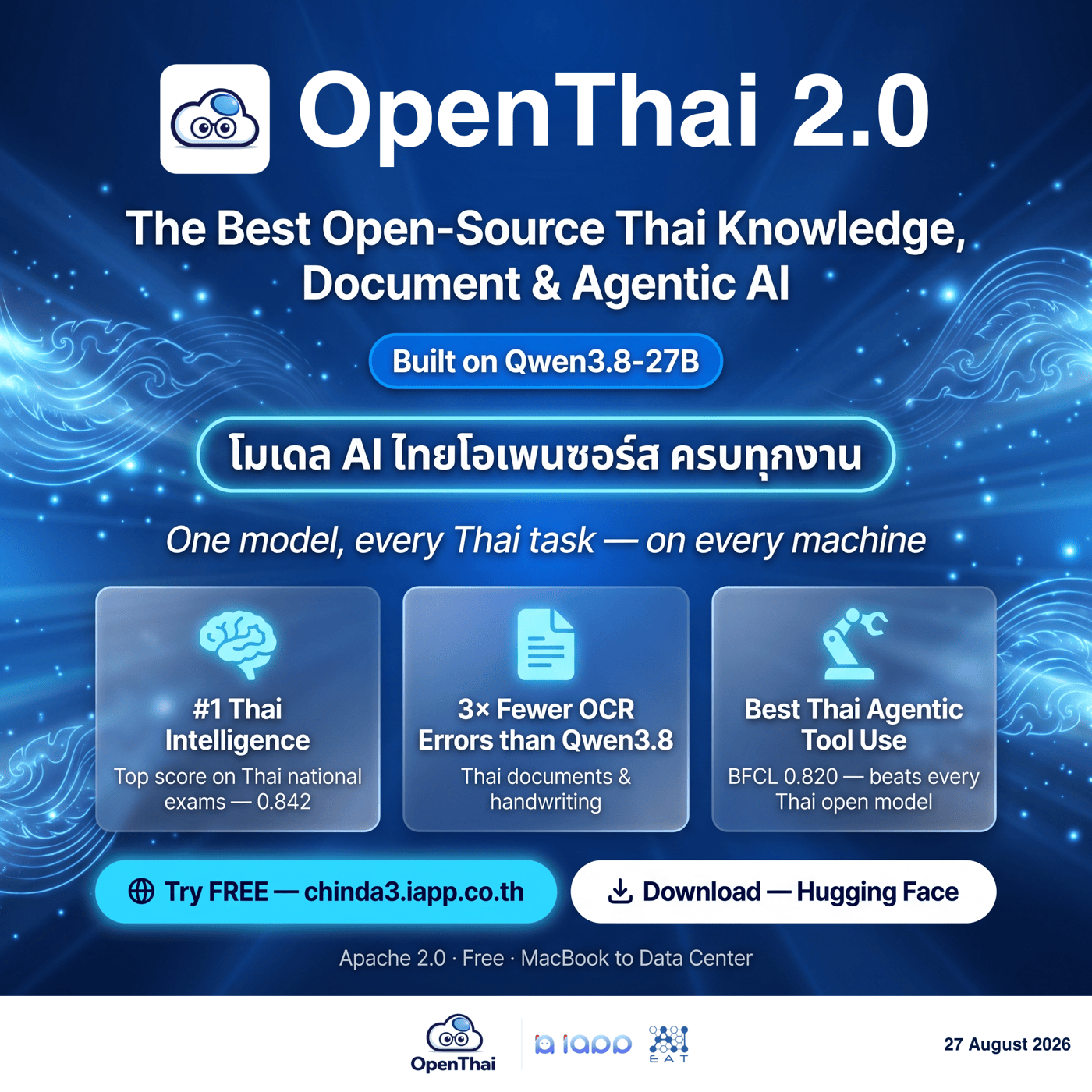
An open all-in-one Thai AI — it reads Thai documents and handwriting at specialist level, answers with Thai knowledge in natural, explanatory Thai, and leads its base model on agentic tool use.
The OpenThai project proudly presents OpenThai 2.0, our new flagship: a 27B-parameter multimodal (image + text) language model built on Qwen3.8-27B, with full weights released under Apache 2.0 — free for commercial use, and able to run entirely inside your own infrastructure, so no data ever leaves your organization.
Built by iApp Technology together with the Artificial Intelligence Entrepreneur Association of Thailand (AIEAT), for everyone who works with Thai documents, Thai handwriting, Thai knowledge, and tool-calling agents.
Try it live
Talk to the real model in your browser — free, nothing to install.
Free live demo — no installchinda3.iapp.co.th
Download the model
OpenThai 2.0 (27B) — Hugging Facehuggingface.co/iapp/openthai2.0-qwen3.8-27b
iapp/openthai2.0-qwen3.8-27b
Or run it on your own machine the easy way, via Ollama:
OpenThai 2.0 on Ollama — one command, runs locallyollama.com/openthai/openthai2.0-qwen3.8-27b
ollama run openthai/openthai2.0-qwen3.8-27b
Shipped in 5 formats, from a MacBook to NVIDIA Blackwell:
| Format | Repo | Runs on |
|---|---|---|
| bf16 | openthai2.0-qwen3.8-27b | vLLM / transformers · 1× 80 GB GPU |
| GGUF Q4_K_M / Q8_0 + vision mmproj | openthai2.0-qwen3.8-27b-GGUF | llama.cpp · CPU or consumer GPU (17 / 29 GB) |
| MLX 4-bit | openthai2.0-qwen3.8-27b-MLX-4bit | Apple silicon, 24 GB+ unified memory (~16 GB) · or TensorFold on Mac / NVIDIA |
| INT8 W8A8 | openthai2.0-qwen3.8-27b-INT8-W8A8 | vLLM · ~40 GB-class GPUs |
| NVFP4 | openthai2.0-qwen3.8-27b-NVFP4 | vLLM · NVIDIA Blackwell |
🌟 Highlights
- Best-in-class Thai knowledge among open models — 0.842 on Thai national exams (OpenThaiEval), above the base model (0.820), Typhoon 2.5 (0.742) and Pathumma (0.660), with the top Thai instruction-following score (IFEval-TH 0.795).
- Reads Thai documents and handwriting at specialist level — Thai handwriting error cut by 60% versus the base model (0.261 vs 0.649 CER), books and Royal Gazette pages by 66% (0.126 vs 0.370) — the only open Thai model in these tables that reads documents at specialist level and answers questions about them in the same model.
- A real tool-calling agent — 0.820 on the Berkeley Function-Calling Leaderboard (BFCL), ahead of both its base model and Typhoon 2.5, with multi-turn agentic episodes at 0.775 versus Typhoon's 0.550. Coding (HumanEval): 0.957.
- Answers in natural, explanatory Thai — and switches to terse or JSON output on request.
- 1.5× faster decoding — ships the multi-token-prediction (MTP) draft head for self-speculative decoding: a measured 75.2 tok/s versus 50.1 tok/s, with token-identical outputs.
- Genuinely open — Apache 2.0, full weights plus a standalone LoRA adapter, and it keeps its base model's general intelligence.
📊 Benchmark results
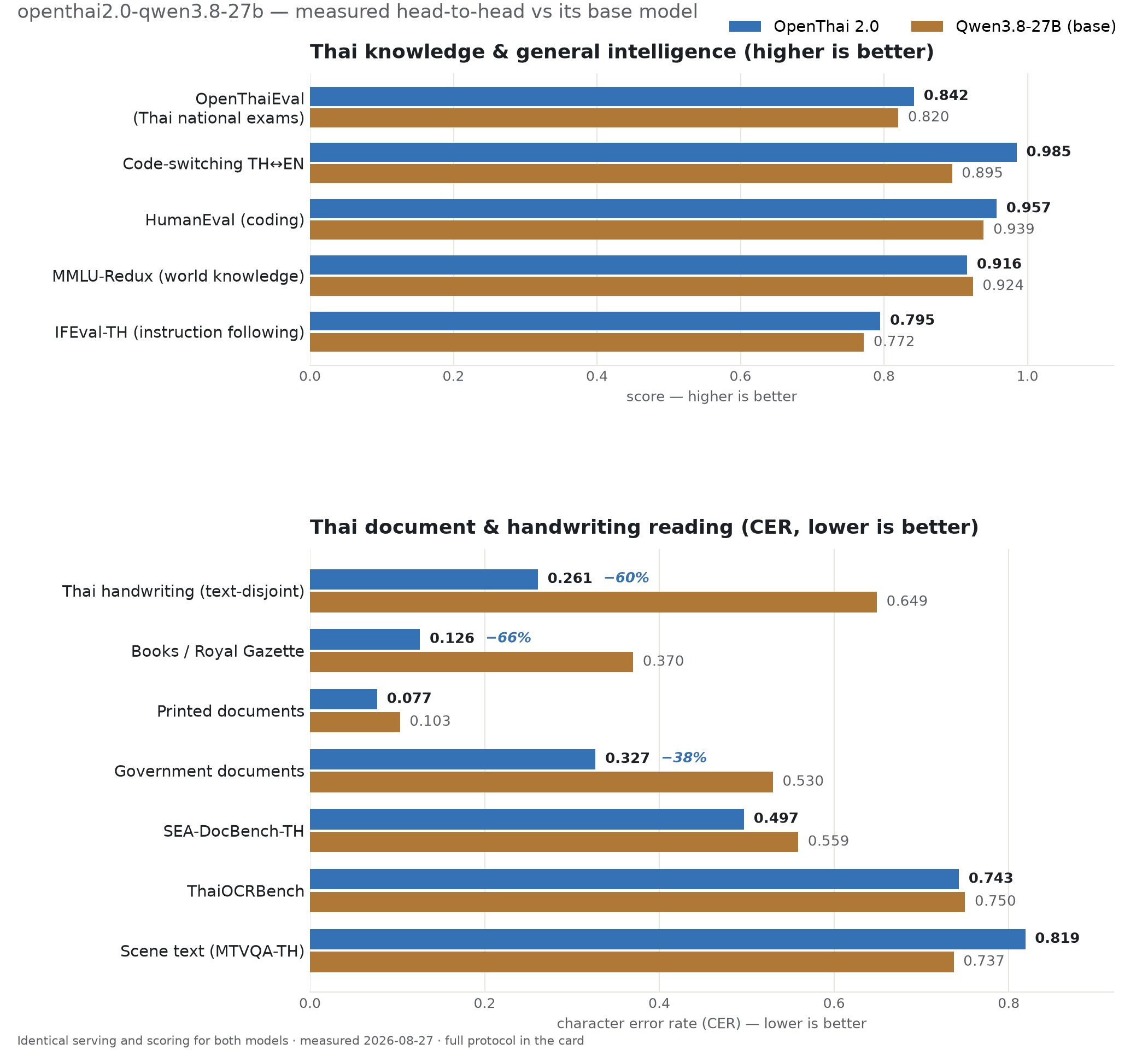
All numbers measured by us under identical serving conditions, each model with its own recommended prompts and parameters, and the same answer-scoring pass applied to every model — so the experiment can be repeated from the linked checkpoints.
Thai knowledge & language (higher is better)
| Evaluation | OpenThai 2.0 (27B) | Qwen3.8-27B (base) | Typhoon 2.5 (30B-A3B) | Pathumma think 3.0 (8B) |
|---|---|---|---|---|
| OpenThaiEval (Thai national exams) | 0.842 | 0.820 | 0.742 | 0.660 |
| Code-switching TH↔EN (n=200) | 0.985 | 0.895 | 0.940 | 0.990 |
| HumanEval (coding) | 0.957 | 0.939 | 0.957 | 0.805 |
| MMLU-Redux (world knowledge, 5.7k) | 0.916 | 0.924 | 0.884 | 0.762 |
| IFEval-TH (Thai instruction-following) | 0.795 | 0.772 | 0.749 | 0.498 |
| IFEval (EN instruction-following) | 0.914 | 0.902 | 0.846 | 0.630 |
Code-switching 0.985 versus 0.990 is one sample on n=200 — a statistical tie.
Thai document & handwriting reading (CER — lower is better)
| Evaluation | OpenThai 2.0 (27B) | Qwen3.8-27B (base) | Typhoon-OCR 1.5 (2B) | Pathumma-vision 2.0 (7B) |
|---|---|---|---|---|
| Wikisource TH — books/gazette (n=608) | 0.126 | 0.370 | 0.271 | 0.931 |
| DocBench — government docs (n=906) | 0.327 | 0.530 | 0.551 | 0.691 |
| SEA-DocBench-TH (n=1,499) | 0.497 | 0.559 | 0.575 | 0.832 |
| ThaiOCRBench (n=2,808) | 0.743 | 0.750 | 0.793 | 0.894 |
| MTVQA-TH — scene text (n=231) | 0.819 | 0.737 | 1.000 | 0.905 |
| Thai handwriting — text-disjoint (n=916) | 0.261 | 0.649 | 0.054 | 0.821 |
| OCR-Eval-104 — printed (n=104) | 0.077 | 0.103 | 0.014 | 0.352 |
ℹ️ Reading the comparison honestly
Typhoon-OCR 1.5 is an excellent transcription specialist — on clean printed lines and isolated handwriting it beats every model here, including ours. It is also only a transcriber: it accepts a single fixed OCR prompt, so document Q&A and scene-text questions score at or near total error (MTVQA 1.000), and it has no knowledge or assistant ability. OpenThai 2.0 leads on books/gazette reading and on Thai knowledge and instruction-following — the only open Thai model in these tables that reads documents at specialist level and answers questions about them in the same model. Scene text (MTVQA) is its weakest reading track.
Agentic tool use — BFCL (higher is better)
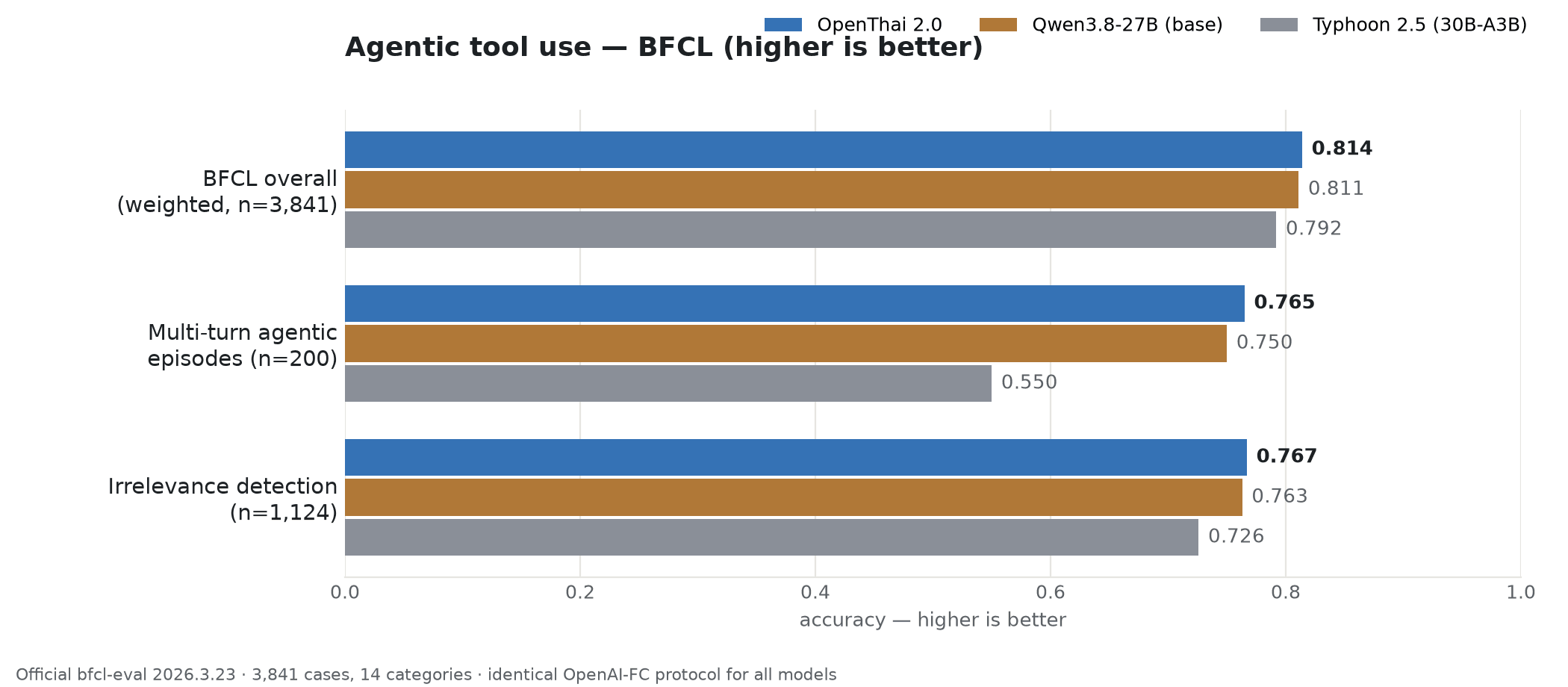
Measured with the official Berkeley Function-Calling Leaderboard harness (bfcl-eval 2026.3.23): 3,841 cases across 14 categories, identical OpenAI-function-calling protocol for every model.
| Evaluation | OpenThai 2.0 (27B) | Qwen3.8-27B (base) | Typhoon 2.5 (30B-A3B) |
|---|---|---|---|
| BFCL overall, weighted (n=3,841) | 0.820 | 0.811 | 0.792 |
| Multi-turn agentic episodes (n=200) | 0.775 | 0.750 | 0.550 |
| Knowing when not to call a tool (n=1,124) | 0.779 | 0.763 | 0.726 |
Thai-document fine-tuning did not tax tool use: OpenThai 2.0 leads every summary row, with the largest gap on multi-turn agentic episodes (+22.5 points over Typhoon 2.5).
🧾 Model details
| Model name | iapp/openthai2.0-qwen3.8-27b |
| Base model | Qwen/Qwen3.8-27B (dense VLM, hybrid Mamba-attention) |
| Parameters | 27B |
| Modality | image + text → text |
| Context length | 262,144 tokens (max_position_embeddings) |
| Languages | Thai (primary), English |
| Precision | bfloat16 safetensors (~52 GB) + standalone LoRA adapter (7 GB, rank 64) · GGUF / MLX / INT8 / NVFP4 |
| MTP draft head | included (1 layer) — self-speculative decoding, ~1.5× faster with identical outputs |
| Training stack | ms-swift 4.3 · LoRA r64/α64 all-linear · 3× NVIDIA H100 |
| Serving | vLLM ≥ 0.19 (verified, OpenAI-compatible) |
| License | Apache 2.0 |
🔬 How it was trained
Three stages of LoRA fine-tuning (r=64, α=64, all-linear) on ~143,000 verified rows:
- Scale SFT — teaches reading — verified transcription plus explanatory document-QA over Thai handwriting, books, gazettes, and government documents (92,893 rows, 2 epochs).
- Knowledge layer — teaches Thai reasoning — grounded MCQ chain-of-thought built from Thai law and government corpora, leak-checked against evaluation questions.
- Adherence layer — teaches control — instruction rows kept only if the answer passed a programmatic constraint check (bullet counts, must-include words, JSON-only, length caps) — zero-hallucination instruction data.
Every stage ran through a verify-everything pipeline: answers checked against human-confirmed ground truth, images the model could not read routed away from explanatory training (anti-hallucination), malformed-Thai filters on every row, and a benchmark-leakage guard run on the whole corpus on every change.
🚀 Getting started
Serve with vLLM on a single 80 GB GPU:
vllm serve iapp/openthai2.0-qwen3.8-27b \
  --max-model-len 32768 --gpu-memory-utilization 0.85 \
  --max-num-seqs 128 --reasoning-parser qwen3 --trust-remote-code
For ~1.5× faster decoding with identical outputs, add the MTP flag:
--speculative-config '{"method":"qwen3_5_mtp","num_speculative_tokens":2}'
Call it OpenAI-style (here reading a document image):
import base64
from openai import OpenAI

client = OpenAI(base_url="http://localhost:8000/v1", api_key="none")
img = base64.b64encode(open("thai_document.jpg", "rb").read()).decode()

r = client.chat.completions.create(
    model="iapp/openthai2.0-qwen3.8-27b",
    messages=[{"role": "user", "content": [
        {"type": "image_url", "image_url": {"url": f"data:image/jpeg;base64,{img}"}},
        {"type": "text", "text": "อ่านข้อความในเอกสารนี้ทั้งหมด"},
    ]}],
    temperature=0.0,
    extra_body={"repetition_penalty": 1.05,
                "chat_template_kwargs": {"enable_thinking": False}},
)
print(r.choices[0].message.content)
Ask in natural Thai and it explains; add "ตอบสั้น ๆ" (answer briefly) or "ตอบเป็น JSON เท่านั้น" (JSON only) for terse or structured output.
⚠️ Give it room to generate — the #1 setup mistake
The model reasons before it answers, so a small max_tokens cap gets eaten by reasoning and the reply comes back empty. Serve with --max-model-len 32768 (or more) and leave max_tokens unset, or set it ≥ 8192. Measured: capped at 1024 → ~33% empty replies; unset → ~6%.
Before you serve, know these:
--max-num-seqs 128is required — the hybrid Mamba architecture allocates one cache block per decode sequence; vLLM's default (1024) aborts engine startup.- Keep thinking ON for all text-only requests (serve with
--reasoning-parser qwen3) — disable thinking only for image-attached OCR/transcription requests. - Always send
repetition_penalty: 1.05for long-form Thai generation.
⚡ Run with TensorFold (Mac or NVIDIA)
TensorFold serves the MLX 4-bit checkpoint iapp/openthai2.0-qwen3.8-27b-MLX-4bit through an OpenAI-compatible API on Apple Silicon and on NVIDIA GPUs. It speeds up decoding with speculative drafts, and every drafted token is checked against the model, so replies are the same as TensorFold decoding this checkpoint one token at a time. The same checkpoint runs on both backends, with image input.
These instructions are written for TensorFold v0.6.5.
DGX Spark and other NVIDIA GPUs
Needs compute capability 8.9 or newer: RTX 40 / 50 series, Hopper, Blackwell, including the DGX Spark (GB10).
docker run -it --gpus all --ipc=host --network host \
  -v ~/.cache/huggingface:/root/.cache/huggingface \
  nvcr.io/nvidia/pytorch:26.07-py3

# inside the container
python -m pip install "tensorfold[vision] @ git+https://github.com/ashhart/TensorFold.git@v0.6.5"
tensorfold pull iapp/openthai2.0-qwen3.8-27b-MLX-4bit z-lab/Qwen3.8-27B-DFlash2
tensorfold serve iapp/openthai2.0-qwen3.8-27b-MLX-4bit \
  --name openthai2.0 --host 0.0.0.0 --port 8080 --vision
The first start compiles CUDA kernels for your GPU, which takes a few minutes once. Add --parallel 4 to decode up to four requests together. On CUDA the draft model is required: pull it as above, or serve with --no-drafts.
Apple Silicon (MLX)
48 GB of unified memory or more is recommended. On a 32 GB Mac the model does not fit TensorFold's default budget (70% of RAM); raise it with TENSORFOLD_MEMORY_LIMIT_GB, leaving little memory for other apps.
python -m pip install "tensorfold[vision] @ git+https://github.com/ashhart/TensorFold.git@v0.6.5"
tensorfold pull iapp/openthai2.0-qwen3.8-27b-MLX-4bit z-lab/Qwen3.8-27B-DFlash2
tensorfold serve iapp/openthai2.0-qwen3.8-27b-MLX-4bit --name openthai2.0 --vision
Call it
Any OpenAI client works with base URL http://<host>:8080/v1 and model openthai2.0.
from openai import OpenAI

client = OpenAI(base_url="http://localhost:8080/v1", api_key="none")

# Text
r = client.chat.completions.create(
    model="openthai2.0",
    messages=[{"role": "user", "content": "สรุปสาระสำคัญของ พ.ร.บ. คุ้มครองข้อมูลส่วนบุคคล ใน 3 ข้อ"}],
    max_tokens=4096,
)
print(r.choices[0].message.content)

# Thai document image (data URL; start the server with --vision-urls to accept public HTTPS links)
import base64
img = base64.b64encode(open("document.png", "rb").read()).decode()
r = client.chat.completions.create(
    model="openthai2.0",
    messages=[{"role": "user", "content": [
        {"type": "text", "text": "อ่านข้อความทั้งหมดในเอกสารนี้"},
        {"type": "image_url", "image_url": {"url": f"data:image/png;base64,{img}"}},
    ]}],
    max_tokens=4096,
)
print(r.choices[0].message.content)
The model thinks before it answers by default; the reasoning arrives in reasoning_content and the answer in content, so leave enough max_tokens. Start the server with --no-thinking to answer directly.
Notes
- Draft model.
z-lab/Qwen3.8-27B-DFlash2(Apache-2.0) was trained on base Qwen3.8-27B, not on OpenThai 2.0. It accepts fewer drafted tokens on Thai replies, so the speedup is smaller than on the base model; the replies themselves are unaffected. Send"draft": falsein a request to get the one-token-at-a-time reference. - Same output, same engine. Drafted and serial replies match within TensorFold on this checkpoint. Output differs from the bf16 model served by vLLM or transformers, because the weights are 4-bit.
- Why MLX 4-bit on NVIDIA too. TensorFold also reads the NVFP4 checkpoint on one NVIDIA GPU, but in TensorFold's own measurements of base Qwen3.8-27B on a DGX Spark, the MLX 4-bit checkpoint decoded faster.
⚠️ Limitations and responsible use
- Structured extraction is at parity with the base model, no better — on judged ThaiOCRBench it scores 0.568 versus the base's 0.570 (a statistical tie); the loss concentrates in table parsing, key-value mapping, and diagram VQA. For heavy form/table extraction pipelines, evaluate on your own documents first.
- Long free-form answers vary between generations — for reproducible outputs set temperature 0 with repetition_penalty 1.05, and verify facts independently either way.
- Terse-on-request compliance is about 40% — the model defaults to an explanatory style; use explicit formats such as "ตอบเป็น JSON เท่านั้น" for machine-parsed outputs.
- Scene text (signs, storefronts) is its weakest reading track — for photos of signage, prefer the base model or a scene-text specialist.
- Not evaluated for: Thai dialects, vertical/rotated text, medical or legal advice. Handwriting remains genuinely hard — 0.261 CER means roughly one character in four is still wrong on difficult samples — and the model can still hallucinate on illegible input.
Recommended: pair with RAG for factual and regulated domains
This model is strongest at reading, explaining, and answering over documents you give it. For tax, legal, medical, or any compliance-sensitive work, run it with retrieval-augmented generation (RAG) over authoritative sources plus human review, rather than relying on closed-book recall.
OpenThaiRAG — Thai-native RAG frameworkopenthai.ai/openthairag
For the legal domain specifically, use our purpose-built Thai legal model: OpenThai 2.0 Legal
🙏 Credits
Built by the OpenThai team (iApp Technology), launched jointly with the Artificial Intelligence Entrepreneur Association of Thailand (AIEAT), on the Qwen/Qwen3.8-27B base model (Apache 2.0).

Training and evaluation ran on 8× NVIDIA H100 GPUs generously provided by Siam AI Corporation — thank you for supporting open Thai AI.